Strategy 11 min read
Why a Custom Business Tool Is More Cost-Effective Than Generic SaaS
Why SMBs that invest in custom business tools get a higher ROI than with generic SaaS. Data-driven analysis, illustrative scenario and FAQ.

Table of contents10
Many digital transformation projects fall short of their goals — and very often, it isn't a technology problem. It's a fit problem between the tool and the business. The company adopts a generic SaaS solution, spends weeks adapting it, then realizes the gap with its actual processes persists. Employees work around the tool, data gets scattered, and the promised time savings never materialize.
If you run an SMB or manage the tools of a growing company, this article helps you understand when and why a custom business tool becomes more cost-effective than a generic SaaS solution — and when it doesn't.
Key takeaways
- Generic SaaS pays off when your processes are standard; less so when your team has to work around it (spreadsheets on the side, double entry, consultants for every change).
- The real cost of SaaS is calculated over 3 years: per-user licenses, customization, connectors, training, possible migration.
- A custom tool is an upfront investment followed by maintenance; you own it (code and data) and it follows your processes.
- The best profitability indicator: the hours of data entry, re-keying, and chasing that disappear every week.
- Custom isn't always the answer: for a standard, low-volume need, off-the-shelf software is often cheaper.
The Generic SaaS Trap
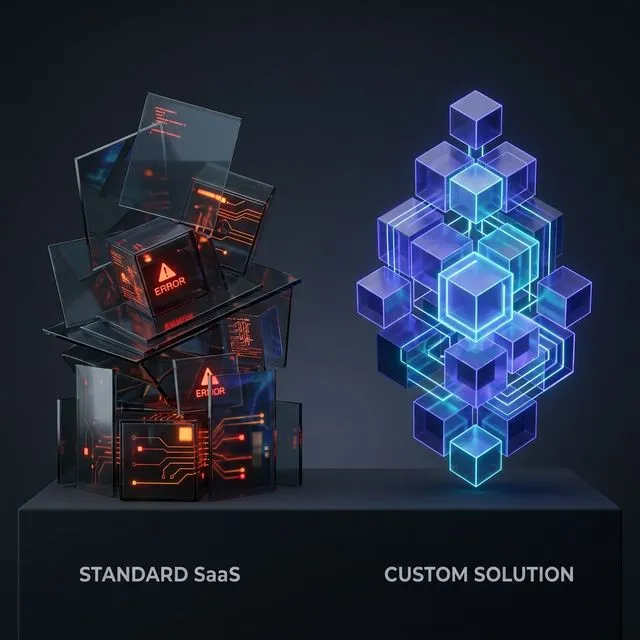
SaaS (subscription software) is designed to serve the broadest possible audience. That's its commercial strength — and its structural limitation. A CRM like Salesforce or HubSpot offers hundreds of features, but how many actually match your daily work?
The paradox: the more feature-rich a SaaS, the harder it is to master. It's common for teams to use only a small share of the available features while paying for all of them.
The Hidden Costs No One Mentions
When a vendor advertises a "per user per month" price, that's just the tip of the iceberg:
- Per-user licenses: multiplied by the whole team and 12 months, they quickly reach tens of thousands of euros a year for a 30-person team on advanced plans
- Customization: adapting the tool to your processes often requires an integrator or specialist consultant, billed by the day
- Training: several days per employee for a tool that doesn't match how you work
- Third-party connectors: each connector (Zapier, Make, custom development) adds a subscription and a point of failure
- Data migration: switching SaaS providers is a project in its own right
- Vendor lock-in: if the vendor changes pricing, terms, or removes a feature, you have little recourse
Over 3 years, the actual cumulative cost of a poorly fitting generic SaaS can exceed that of a custom-built tool.
5 Signs Your SaaS Is Costing Too Much
Recognize at least 3 of these situations? It's time to question your current tools:
- Your teams use spreadsheets alongside the official tool
- You have more than 3 tools that don't talk to each other
- Manual data entry takes several hours per week per employee
- You pay licenses for users who no longer use the tool
- Every change request requires an external consultant
The Custom Advantage: A Tool That Works for You
A custom business tool is designed around your processes, not the other way around. No unnecessary features, no hidden menus, no workarounds. Every screen, button, and automation matches a real need of your team.
Predictable, Controlled Cost
A custom tool is an upfront investment — as a rough guide, €15,000 to €50,000 depending on complexity — with a first version often delivered within weeks. No monthly per-user license. The code belongs to you: it's a company asset, not a recurring expense.
At Iselia Projects, scope, budget, and timeline are written into the proposal before we start. If the scope changes along the way, the change is priced and approved with you before any work begins.
Gains Measured in Hours
The benefit of a custom tool is measured first in hours handed back to your team: data entry that disappears, reminders that go out on their own, reports that build themselves. Then come fewer errors thanks to a single, validated source of data, and the licenses you no longer pay.
These gains can be estimated before starting any project: volume of each task × time per occurrence × automatable share. That's what our time savings calculator does, with visible assumptions — an indicative estimate, not a promise.

Room to Grow
Your business evolves? Your tool evolves with it. No waiting for a SaaS vendor to add a feature to its roadmap. You decide, we build. That's the philosophy we apply at Iselia Projects: changes are delivered progressively, without service interruption.
Illustrative Scenario: A Construction Company That Ends Double Entry
Illustrative scenario built on realistic assumptions: not an actual client, and figures are examples.
Consider a 45-person construction business specializing in energy-efficient renovation.
Starting point: 3 tools (generic CRM + project tracking spreadsheet + separate invoicing software). Project managers spend around ten hours a week copying data between tools, and estimation errors creep into quotes.
Planned solution: a single business tool covering prospect tracking, project management, estimating, and invoicing, connected to the existing accounting software.
What you can aim for:
- Double entry virtually eliminated: data is entered once, in the right place
- More reliable quotes thanks to price libraries and automatic checks
- Licenses dropped (see the table below)
- Hours handed back to project managers, to measure before and after
3-Year Cost Comparison
Example based on assumptions: 30 users, an advanced SaaS plan with an integrator, a €25,000 custom tool, and €300/month maintenance. Rerun the numbers with your own figures.
| Criteria | Generic SaaS | Custom Tool |
|---|---|---|
| Year 1 cost | €36,000 (licenses + setup) | €25,000 (development) |
| Year 2 cost | €36,000 | €3,600 (maintenance) |
| Year 3 cost | €36,000 | €3,600 (maintenance) |
| 3-year total | €108,000 | €32,200 |
| Code ownership | ❌ None | ✅ Full |
| Fit with your processes | Partial | Designed for them |
| Vendor dependency | High | Low |
| Feature updates | Subject to the vendor's roadmap | On demand |
3-year gap in this example: €75,800, not counting hours saved. With a simpler SaaS plan or fewer users, the gap narrows or even reverses — which is why it's worth doing the math.
When to Choose Custom Development?
Custom development is the right choice if:
- Your processes are specific to your industry and poorly covered by market software
- You lose several hours a week to manual entry, double entry, or copy-pasting between tools
- Your current tools don't talk to each other and create data silos
- You want a competitive edge your competitors don't have
- Your team works around the official tool with spreadsheets or parallel processes
- You're planning significant growth and your current tools won't keep up
Recognize several of these situations? The first step is to structure your needs. Our guide to writing your business app requirements document walks you through it step by step.
Our Approach at Iselia Projects
Iselia Projects builds custom automations and business tools, often AI-powered, that take over SMBs' repetitive work to give teams hours back. We start from your business, not from the technology. See our support plans.
Still using Excel or several tools that don't talk to each other? Our migration guide explains how to consolidate your tools without business interruption.
Our process is transparent and follows 5 steps:
- Free assessment — We list your repetitive tasks, estimate recoverable hours, and identify priorities
- Proposal and scoping — Scope, budget, and timeline in writing; any change is priced before it's undertaken
- Mockups — You approve screens and flows before development
- Build and testing — An application you own 100%, a test environment available throughout, go-live with human oversight
- Ongoing care and improvements — Monitoring, support, measurement of hours saved, and changes depending on your plan
Every step is approved by you. No surprises at delivery.

Looking for more advice on structuring your tools? Check out our blog articles.
The Real Cost of Doing Nothing
Many SMB leaders evaluate the cost of a custom tool but rarely calculate the cost of not acting. Every month with ill-fitting tools adds up:
- Time cost: take the hours your team spends each week on re-keying and manual reporting, multiply by a fully loaded hourly cost and by 52 weeks. For example, 14 hours a week at €45/hour comes to €32,760 a year — run the calculation with your own figures
- Error cost: every manual re-entry carries a risk of error — in invoicing, that means disputes, credit notes, and delayed payments
- Employee frustration and turnover: tedious, repetitive work weighs on engagement, and departures are expensive — Gallup (2019) estimates that replacing an employee can cost between half and twice their annual salary
- Competitive gap: while competitors streamline their operations, your team copies data between spreadsheets
After a couple of years of inaction, the accumulated cost of inefficiency can exceed the investment a custom tool would have required — with nothing to show for it: no asset, no data centralization.
The question isn't only "Can I afford a custom tool?" — it's also "What is the status quo costing me?"
Where Custom Tools Give the Most Hours Back
Custom tools and automations have the most impact in industries where processes are specific and poorly served by horizontal SaaS:
- Construction and trades: site management, equipment tracking, subcontractor scheduling, quotes and progress billing. Generic project tools don't reflect multi-site coordination, weather delays, and materials procurement — see construction and trades
- Professional services: resource allocation across client work, time tracking tied to invoicing, margin by project — see accounting firms
- Transport and logistics: planning, delivery tracking, proof-of-delivery documents, carrier invoices — see transport and logistics
- Allied health practices: appointment management with practitioner constraints, reminders, secure document handling — see veterinary and allied health
- Real estate: lead follow-up, viewing scheduling, owner reporting, document collection — see real estate agencies
The common pattern: the more specific and repetitive your processes, the faster a custom tool pays for itself.
Frequently Asked Questions
How much does a custom business tool cost?
As a rough guide, a custom business tool costs between €15,000 and €50,000 depending on complexity (screens, integrations, automations); a targeted automation can cost much less. It's an upfront investment with no per-user monthly license, followed by maintenance. At Iselia Projects, the assessment and proposal are free.
How long does it take to build a custom tool?
Usually 4 to 8 weeks from requirements sign-off to a first version in production. More complex projects (multiple modules, heavy integrations) can take up to 12 weeks. Throughout the project, you have access to a test environment to follow progress.
Do I own the code?
Yes, 100%. At Iselia Projects, the source code, automations, and data are yours. You receive the code, technical documentation, and access. If you want to change providers, you can, without restriction.
Is a custom tool harder to maintain than SaaS?
Not if it's looked after. Our support plans include monitoring, security updates, support, and hours for adjustments. The difference from SaaS: when an issue arises, it's handled by the team that knows your tool, without waiting for a vendor's next release.
Can I migrate gradually from an existing SaaS?
Yes. Migration can be progressive: we first connect the new tool to your existing SaaS, migrate data in batches, and switch off the old tool once everything works — without service interruption.
What technologies do you use?
Proven, widely used web technologies (for example TypeScript, React, Python, PostgreSQL databases), chosen for the need and long-term maintainability. For AI, models are chosen by use case and confidentiality (Claude, GPT, Mistral, or open-source models). European hosting is available; you keep ownership of code and data.
Conclusion: Take Action
Investing in a custom business tool means investing in an asset you own, that adapts to your growth, and that gives your team time back every week.
It's the choice of SMBs that want to structure their growth rather than bend to a vendor's constraints — provided they do the math first.
Ready to evaluate the potential of a custom tool for your business? At Iselia Projects, the assessment is free and with no commitment: in 30 minutes, we review your repetitive tasks and your tools, then estimate the hours you could get back. Book your free assessment →
Go further
From this guide to your hours
- Automation Custom business tools Internal apps, client portals, dashboards and automated reports designed for your industry and connected to your data — you own the code.
- Calculator Estimate my hours back Free calculator: your tasks, your volumes, an indicative estimate of the hours saved.
- Support Support plans Monitoring, maintenance and improvements of your automations after go-live.