Technology 10 min read
Mobile Business Apps: When and Why to Invest (SME Guide)
The 5 signals you need a mobile app, responsive vs native comparison, costs, and illustrative deployment scenario.
Table of contents10
In many SMEs, part of the team works away from a desk: on the road, on job sites, in warehouses, at customer premises. Yet many business tools are still built for a desktop screen. The result shows up every day: notes on paper, photos on personal phones, and data entered in the evening or the next day.
When a technician has to stop by the office to type up a job report, a salesperson jots information on paper before re-entering it into the CRM, or a manager waits until Monday to check the numbers, each lost minute repeats itself and ends up costing hours every week.
But a mobile app isn't always the answer. This guide helps you work out when the investment makes sense, which technical approach to choose, and what order of magnitude of cost to expect.
Key takeaways
- Mobile access pays off when your teams re-enter in the office what they saw in the field, or when decisions wait for a manager to get back to their desk.
- There are three approaches: responsive web, progressive web app (PWA) and native iOS/Android; a PWA covers most SME field needs.
- Offline mode is essential as soon as your teams work in basements, rural areas or on job sites.
- The real gain isn't the mobile screen: it's entering data once in the field, followed by automations (report sent to the customer, invoice prepared, schedule updated).
- The budgets given here are orders of magnitude; always price from your actual screens and volumes.
The 5 signals you need mobile access
Not every business tool needs a mobile version. Mobility makes sense when your processes demand it. Here are the 5 clear signals.
1. Your field teams re-enter data at the office
If your technicians, sales reps or drivers write things on paper, take photos on their personal phones, then re-type everything when they get back, you have a structural time leak.
How to quantify it: re-entry time per job × jobs per day × number of field staff. The time savings calculator runs this calculation with your own assumptions.
2. Decisions wait until someone is back at their desk
If a manager can't approve an order, check a schedule or sign off a quote without being at a computer, every decision is delayed.
Impact: slower response and missed business opportunities.
3. Your competitors are more responsive
If a competitor sends a quote from the field while you wait to get back to the office, you lose deals through slowness, not lack of skill.
Impact: a direct hit to competitiveness.
4. Field data collection is critical
If your business needs on-site readings, geotagged photos, customer signatures or document scans, a phone is more natural than a computer.
Impact: quality and completeness of field data.
5. Your teams are spread out
If people work across several sites, on the road or remotely, mobile access ensures everyone works from the same, up-to-date data.
Impact: consistent information and coordination.
If you recognize at least 2 of these signals, mobile access is likely to pay off. Check it with the method in our ROI guide.
The 3 technical approaches: which one?
There are 3 ways to make your tool available on mobile, each with strengths and limits. The budgets below are indicative orders of magnitude for an SME, to be confirmed based on the number of screens and integrations.
Approach 1: responsive web app
Principle: your web app adapts automatically to the screen size. No download; it runs in the phone's browser.
Pros: limited extra cost, instant updates, works on every device.
Cons: needs a connection, limited access to phone features (no reliable offline mode, limited notifications).
Indicative budget: a few thousand euros to adapt an existing interface.
Approach 2: progressive web app (PWA)
Principle: a web app that behaves like an installed app. It sits on the home screen, works partly offline and can send notifications (on iPhone, only once added to the home screen, since iOS 16.4).
Pros: one codebase for web and mobile, no app store submission, offline mode possible, notifications.
Cons: partial access to some phone features, slightly behind native for very intensive use.
Indicative budget: from a few thousand to around ten thousand euros on top of the existing app.
Approach 3: native app (iOS/Android)
Principle: an app built for each operating system and downloaded from the App Store or Google Play.
Pros: top performance, full access to phone features, the smoothest experience.
Cons: high development cost, two versions to maintain (or a cross-platform codebase), store review on every release.
Indicative budget: several tens of thousands of euros for both platforms.
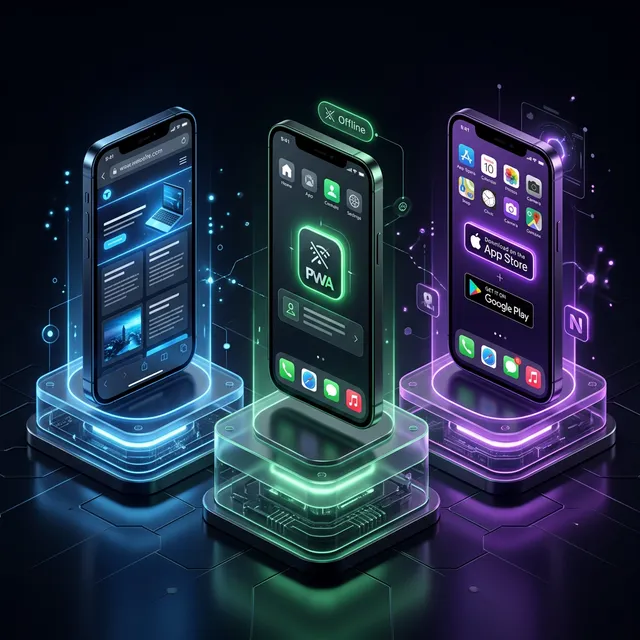
Comparison: responsive vs. PWA vs. native
| Criteria | Responsive | PWA | Native |
|---|---|---|---|
| Budget (indicative) | Lowest | Mid-range | Highest |
| Timeline (indicative) | 1–2 weeks | 3–6 weeks | 2–4 months |
| Offline | No | Partial | Full |
| Notifications | No | Yes (on iPhone once installed) | Yes |
| GPS access | Via browser | Via browser | Native |
| Camera | Basic | Basic | Advanced |
| Maintenance | 1 codebase | 1 codebase | 2 codebases (or cross-platform) |
| App store required | No | No | Yes |
| Recommended if | Occasional use | Daily use, field teams | Intensive use, critical native features |
Our recommendation for most SMEs: start with a responsive or PWA approach. It covers most field needs for a fraction of the cost of a native app. If specific needs are confirmed after a few months of use, move to native.
Mistakes to avoid
- Building mobile before desktop: the main tool must be solid on desktop first. Mobile is an extension, not the core.
- Putting everything on mobile: the screen is small. Pick the 5–10 features that matter in the field; leave the rest on desktop.
- Ignoring offline mode: if your teams work without signal (basements, rural areas, job sites), offline mode isn't optional.
- Neglecting touch ergonomics: buttons of at least 44 × 44 points (Apple's guideline), short forms. See our UX guide.
- Forgetting security: a lost phone means exposed data. Authentication, encryption and remote lock are essential, in line with GDPR requirements.
Enter it once in the field, automate the rest
The mobile app is only half the gain. The other half comes from what happens after the data is entered: the job report goes to the customer automatically with photos and signature, the invoice is prepared, tomorrow's schedule updates itself, spare-parts stock is adjusted. Without those automations, you're just moving the re-entry from the office to the phone.
At Iselia Projects, we start from your real jobs to find what can disappear: that's the heart of our scheduling & operations automation (job tracking, dispatching, reports). Our construction trades page gives concrete examples of field tasks that can be automated, with hour estimates presented as indicative.
Mobile security considerations
Mobile brings specific security challenges:
- Device loss or theft: remote wipe is essential for apps handling sensitive data
- Public networks: mobile users connect over café Wi-Fi, so all traffic must use HTTPS
- App store reviews: Apple and Google review apps for security and privacy; allow time in your schedule
- Offline storage: data cached on the device must be encrypted
- Biometric login: Face ID or fingerprint adds security without friction
None of this complicates development much if it's planned from the start.
Illustrative scenario: a maintenance SME goes mobile
Illustrative scenario built on assumptions: not an actual client, and the figures are examples.
Profile: industrial maintenance company, 28 people including 18 field technicians.
Starting point (assumption): each technician spends about 45 minutes a day re-typing job reports at the office. Photos stay on personal phones and are never centralized.
Solution considered: a PWA built into the existing business app, with:
- A simplified job report form (5 fields plus photos)
- Photo capture with automatic geotagging
- Offline mode (sync as soon as signal returns)
- Customer signature on screen
- Notifications for new jobs
- Automatic report delivery to the customer and invoice preparation
What you can expect in a case like this: data entered once on site, reports sent the same day instead of the next, photos centralized and attached to the right job. If re-entry dropped from 45 to around 10 minutes a day, the saving would be about 35 minutes × 18 technicians, i.e. more than 10 hours a day across the team. That's an estimate: measure your own situation before and after.
Our mobile approach at Iselia Projects
At Iselia Projects, mobility is built in from the requirements document stage.
Our method:
- Field observation: we watch your teams at work to identify the critical mobile tasks
- Technical recommendation: responsive, PWA or native, based on your real needs and budget
- Field screens designed for mobile: built for fingers, sunlight and site conditions
- Real-world testing: in the field, on weak networks, before go-live
Our support plans cover design, development and field rollout.

Frequently Asked Questions
Do I need a separate mobile app or an adaptation of my existing tool?
For most SMEs, adapting the existing tool (responsive or PWA) is the best option: it costs less, is easier to maintain and covers the vast majority of field needs. A native app is justified for intensive use that requires advanced phone features.
How much does mobile access for my business tool cost?
It ranges from a few thousand euros for a responsive adaptation to several tens of thousands for a native iOS and Android app. A PWA sits in between and often offers the best cost/benefit ratio for an SME. These figures are indicative: an accurate quote starts from the list of field screens.
Is offline mode really necessary?
If your teams work in areas with good coverage (offices, cities), it isn't critical. If they work in basements, rural areas or on job sites, it's essential.
Is my data secure on mobile?
Yes, provided you follow best practices: mandatory authentication, encryption of data stored on the device, remote lock if a phone is lost, and GDPR compliance.
Do I need to provide work phones to my teams?
Not necessarily. Bring Your Own Device (BYOD) works with a PWA or responsive approach. What matters is protecting business data and framing that use with a clear policy, whatever the device.
How long does it take to add mobile access?
From one or two weeks for a simple responsive adaptation to several months for a full native app. A PWA typically takes 3 to 6 weeks and offers the best balance between features and timeline.
Conclusion: mobility that serves efficiency
The goal isn't to have a mobile app because it's modern. It's to remove the friction that slows your field teams and delays decisions, then automate everything that follows data entry.
The 5 signals, 3 approaches and scenario in this guide help you make the right call: the one that delivers a measurable return without budget surprises.
Are your field teams losing time because your tool isn't mobile? At Iselia Projects, the assessment is free and with no commitment: in 30 minutes, we review your repetitive tasks and your tools, then estimate the hours you could get back. You can also book a call directly. Book your free assessment →
Go further
From this guide to your hours
- Automation Custom business tools Internal apps, client portals, dashboards and automated reports designed for your industry and connected to your data — you own the code.
- Calculator Estimate my hours back Free calculator: your tasks, your volumes, an indicative estimate of the hours saved.
- Support Support plans Monitoring, maintenance and improvements of your automations after go-live.